Maximizing Your Recipe Journal: A Practical Guide to Instant Download, KDP Readiness, and Design Specifications
For creators, food bloggers, and aspiring authors, the Recipe Journal is more than just a notebook—it's a powerful tool for organizing culinary creativity and launching it into the digital marketplace. Whether you're building a personal collection or preparing a professional product for platforms like Kindle Direct Publishing (KDP), understanding the format, design settings, and usability of your journal is essential.
Instant Download: Why It Matters for Recipe Journal Users
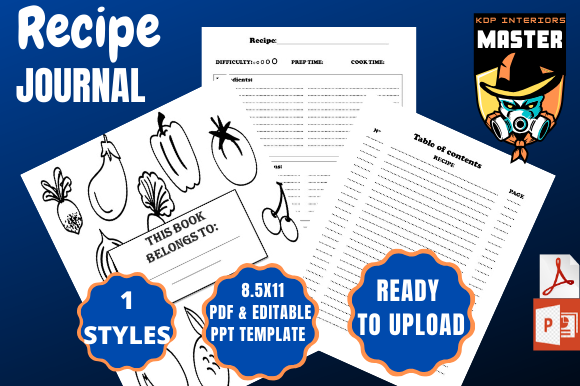
One of the standout features of the Recipe Journal is its instant download format. This allows users to access the template immediately after purchase, eliminating the wait time associated with physical products. The instant download comes in two formats: a PDF file for print and digital use, and a PPT file for those who prefer to edit slides or repurpose content visually.
The PDF format is especially useful for users who want to maintain a consistent layout across devices or print the journal for hands-on use. The PPT file, on the other hand, gives creative flexibility—ideal for educators, food influencers, or recipe developers who want to customize layouts or integrate the journal into presentations or social media content.
Design Specifications: Understanding the Details
When preparing your Recipe Journal for print or digital distribution, especially on platforms like KDP, attention to design specifications is crucial. The standard dimensions of 8.5 x 11 inches provide a generous canvas for recipe layouts, ingredient lists, cooking notes, and even personal reflections.
- Dimensions: 8.5 x 11 inches
- Pages: 100 pages
- Format: 1 PDF File + 1 PPT File
- Bleed Settings: Bleed On
The bleed settings are turned on to ensure that any background images or colors extend to the edge of the page without leaving white borders after trimming. This is especially important for a polished, professional look when printing through KDP or other print-on-demand services.
Preparing Your Recipe Journal for KDP Upload
Amazon’s KDP platform is a popular choice for self-publishing, and the Recipe Journal is designed to meet its requirements right out of the box. With 100 pages and bleed settings enabled, the file is ready to upload without additional formatting changes.
Before uploading, however, it’s wise to double-check the following:
- File Type: Ensure you’re uploading the PDF version, as it’s the most compatible with KDP’s upload system.
- Interior Content: Review all pages for consistency, spacing, and alignment—especially if you’ve made edits in the PPT version before converting to PDF.
- Page Count: Confirm that your file includes exactly 100 pages, as this affects printing costs and pricing options.
- Trim Size: Make sure the selected trim size in your KDP dashboard matches the 8.5 x 11 inch dimension of your document.
By following these steps, you can ensure a smooth upload and avoid delays or formatting errors that could affect your product’s presentation or customer satisfaction.
Why 100 Pages Works Best for Recipe Journals
The 100-page count strikes a balance between utility and practicality. It’s enough to hold a substantial collection of recipes, notes, and planning pages without becoming unwieldy or expensive to print. This length is ideal for:
- Cookbook creators who want to feature a variety of dishes
- Meal planners building a structured guide for clients or personal use
- Food bloggers compiling their best recipes into a cohesive product
Each page can be customized to include headers, ingredient lists, step-by-step instructions, and even photos or illustrations. The PPT file offers a user-friendly way to experiment with layouts before finalizing the PDF for print or digital sale.
Workflow Integration: How the Recipe Journal Fits Into Modern Use
In today’s digital-first world, the Recipe Journal serves both analog and digital needs. It bridges the gap between the tactile experience of writing down recipes and the efficiency of digital tools like PPT editing and PDF sharing.
For example, a food influencer might use the PPT version to create visual recipe cards for Instagram stories, then export the same content into the PDF format for a downloadable e-book. Meanwhile, a home cook can print the PDF, bind it, and use it as a personalized family cookbook.
Its compatibility with KDP also makes it a smart choice for those looking to monetize their culinary knowledge. Whether selling on Amazon or offering it as a premium download on a personal website, the journal’s format ensures professional results with minimal effort.
Practical Benefits and Real-World Applications
Here are some of the key benefits users experience with the Recipe Journal:
- Time-saving: Pre-formatted pages reduce the need to design from scratch.
- Professional look: Bleed settings and standard dimensions ensure a clean, bookstore-ready appearance.
- Flexibility: The dual-format download (PDF + PPT) supports both print and digital workflows.
- Scalability: Whether you’re creating a small batch of recipes or a full cookbook, 100 pages provide room to grow.
Imagine a meal prep coach who uses the journal to develop a 30-day plan for clients. They can fill out the pages with weekly menus, shopping lists, and preparation tips, then print and bind the final product. Alternatively, they might convert it into a digital download and sell it directly through their website or via Amazon KDP.
Choosing the Right Format for Your Needs
While the Recipe Journal is optimized for KDP and print use, not every user will have the same goals. Consider your end-use scenario before deciding how to use the files:
- For Print: Use the PDF file with bleed settings enabled to ensure a clean edge after trimming.
- For Digital Sharing: The PDF can be emailed or uploaded to digital platforms for instant access.
- For Customization: Edit the PPT file to change fonts, add branding, or restructure page layouts before exporting to PDF.
Some users may prefer to keep both files—one for editing and one for final output. This workflow is especially helpful for creators who plan to update or repurpose their content regularly.
Final Thoughts: A Versatile Tool for Culinary Creatives
The Recipe Journal is more than a notebook—it’s a complete solution for organizing, designing, and publishing culinary content. Its instant download format, combined with KDP-ready specifications and dual-file delivery, makes it a versatile asset for anyone in the food space.
Whether you’re a home cook, a food blogger, or a professional chef, the journal gives you the tools to create something beautiful, functional, and marketable. By understanding its features and how to use them effectively, you can turn your recipe ideas into a tangible product that stands out in today’s competitive content landscape.