Storyboard for Kids: A Creative Tool for All Ages
Creating stories is a fundamental part of learning, communication, and expression. Storyboard for Kids offers a structured yet flexible way to visualize narratives, whether for educational purposes, creative projects, or business presentations. Designed with simplicity in mind, this product includes a ready-to-use PDF and a PowerPoint file, both formatted to KDP specifications with bleed settings enabled. With 100 pages of content, it’s a versatile resource for a wide range of users.
What Is Storyboard for Kids?
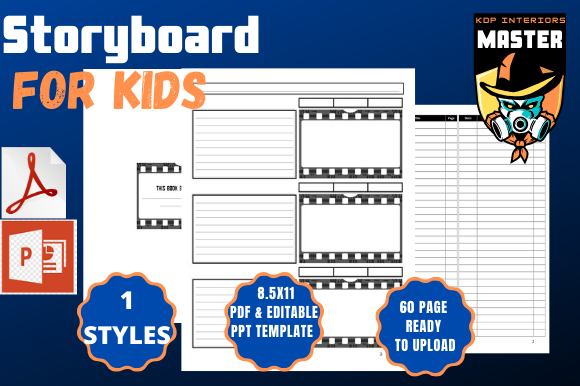
Storyboard for Kids is a printable template pack that helps users plan and organize visual stories. Each page includes panels for drawing scenes alongside spaces for dialogue, descriptions, and notes. It’s especially useful for illustrating children’s books, planning videos, or teaching storytelling techniques. The package is formatted for 8.5x11-inch pages, making it compatible with most home and office printers. The inclusion of both PDF and PPT files allows for digital editing or physical printing, depending on the user’s preference.
Why It Matters to Different Users
What makes Storyboard for Kids valuable isn’t just its format—it’s how it can be applied across different goals and skill levels. Here’s how various audiences might approach this tool:
Beginners and Educators
For parents or teachers introducing storytelling concepts, this product provides a scaffolded approach. Beginners can use the pre-designed panels to guide their children or students through the basics of narrative structure without needing to draw or design from scratch. It’s especially useful in classrooms where visual learning is emphasized.
Example: A homeschool parent might use the storyboard to help a child plan a short illustrated story as part of a writing assignment. The child draws in the panels, writes dialogue, and practices organizing ideas in sequence.
Creative Professionals and Filmmakers
Professionals in animation, filmmaking, or content creation may use Storyboard for Kids as a rapid prototyping tool. Even though it’s designed for younger audiences, the clean layout and KDP-ready formatting make it suitable for quick scene planning or client presentations.
Example: A video producer working on a short animated series for YouTube might print out several pages to sketch out key scenes before moving into digital editing. The physical act of drawing helps visualize pacing and transitions more clearly.
Entrepreneurs and Marketers
Business owners and marketers can repurpose the storyboard format to plan social media campaigns, explainer videos, or customer journey maps. The visual layout helps break down complex processes into digestible sequences.
Example: A small business launching a new product might use the storyboard to outline a short promotional video. Each panel represents a scene showing the problem, solution, and benefits of the product.
Bloggers and Content Creators
Visual content creators who publish on platforms like Instagram, TikTok, or YouTube can benefit from using the storyboard to plan video scripts or photo series. It helps ensure that each shot aligns with the overall message and flow.
Example: A parenting blogger creating a “day in the life” video might use the template to map out scenes from morning routines to bedtime, ensuring variety and narrative flow.
Hobbyists and DIY Enthusiasts
Those who enjoy crafting, scrapbooking, or personal storytelling projects may find the storyboard format useful for organizing personal narratives or family history projects. The ability to print and customize makes it ideal for creative hobbies.
Example: A grandparent creating a personalized storybook for their grandchild might use the storyboard to sketch out each page before scanning and printing it as a keepsake.
Key Considerations When Choosing a Storyboard Template
Different users will prioritize different aspects when evaluating a product like Storyboard for Kids. Here’s a breakdown of the main factors to consider:
Usability and Ease of Access
The product is designed to be user-friendly, requiring no special software beyond a PDF reader or PowerPoint. This makes it accessible even to those with limited technical skills. The instant download feature ensures that users can start working immediately.
Cost and Value
Compared to custom-designed storyboarding tools or software subscriptions, this product offers a one-time purchase with long-term usability. For educators or small creators, the affordability and reusability make it a practical investment.
Quality and Print Readiness
With bleed settings enabled and KDP compatibility, the file is optimized for professional printing. This is especially important for users who plan to self-publish or create physical copies of their stories or presentations.
Flexibility and Customization
The inclusion of both PDF and PPT files allows for a mix of printed and digital workflows. Users can edit the PowerPoint version to adjust panel sizes, add notes, or tailor the layout to specific needs before printing.
Creativity and Learning Value
Storyboarding encourages visual thinking and narrative planning. Whether used by a child learning to write stories or a professional mapping out a marketing campaign, it fosters creativity and structured thinking.
How to Decide If This Is Right for You
If you're someone who values visual organization and wants a straightforward way to plan stories or presentations, Storyboard for Kids could be a great fit. Consider your goals:
- Are you teaching storytelling? The structured layout helps guide young learners through the process of building a narrative.
- Do you create visual content? Use the panels to map out video scenes, social media posts, or illustrations.
- Need a print-ready design? The KDP formatting and bleed settings ensure your printed work looks polished and professional.
- Looking for flexibility? The combination of PDF and PPT files allows for both digital and print use, making it adaptable to your workflow.
Ultimately, the value of Storyboard for Kids lies in how you apply it. Whether you're a parent, educator, creator, or entrepreneur, this tool can support your storytelling and planning needs in a way that’s both practical and creative.