How to Create a Professional Recipe Book with KDP Interior Templates
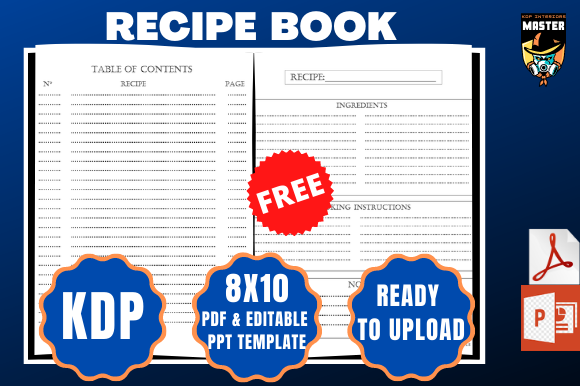
If you're passionate about cooking and want to share your favorite recipes with the world, creating a recipe book is a rewarding way to do so. The Recipe Book Cookbook KDP Interior is a ready-to-use template designed specifically for authors who want to self-publish their cookbooks through Amazon KDP. This 100-page interior template comes in a convenient PDF format, making it easy to customize and upload directly to Kindle Direct Publishing.
Whether you're a home cook, food blogger, or aspiring author, the Recipe Book Cookbook KDP Interior gives you the tools to design a visually appealing and well-structured cookbook without the need for advanced design skills. It's bleed-ready, formatted to 8×10 inches, and includes both a PDF and a PowerPoint file to help you edit and personalize your content effortlessly.
Common Challenges in Self-Publishing a Cookbook
Many aspiring cookbook authors struggle with formatting their content to meet Amazon KDP’s specifications. Poor formatting can lead to unprofessional layouts, incorrect margins, and even rejection during the upload process. Others may not know where to start when organizing recipes, images, and instructions in a way that’s both reader-friendly and print-ready.
Additionally, time constraints and a lack of design knowledge can make the self-publishing process daunting. This is where the Recipe Book Cookbook KDP Interior shines—it eliminates the guesswork and provides a clean, consistent layout that meets KDP's requirements right out of the box.
How the KDP Interior Template Helps
The Recipe Book Cookbook KDP Interior offers a streamlined solution for authors who want to focus on content rather than formatting. With its 100 pages, you have ample space to include a wide variety of recipes, cooking tips, ingredient guides, and more. The template is bleed-enabled, ensuring that your pages will print correctly without any unsightly white borders or cutoff text.
One of the biggest advantages of this template is that it's already optimized for Amazon KDP. You don’t need to worry about adjusting margins, fonts, or page sizes. Simply open the PDF or PowerPoint file, insert your recipes, customize the headers and footers, and you're ready to upload your book.
Practical Applications of the Template
This interior template is ideal for a wide range of cookbook projects. Whether you're creating a family recipe collection, a themed cookbook (like vegan, keto, or slow cooker meals), or a beginner's guide to baking, the Recipe Book Cookbook KDP Interior can be adapted to suit your needs.
- Family recipe books: Preserve generations of cooking traditions with a professionally formatted layout.
- Themed cookbooks: Organize your recipes by category, meal type, or dietary preference for easy navigation.
- Cooking guides: Include step-by-step instructions, ingredient substitutions, and cooking tips to add value for readers.
Because the template includes both a PDF and a PowerPoint file, you can choose the format that works best for your editing style. The PDF is ideal for final print-ready layout checks, while PowerPoint allows for easy drag-and-drop editing of text and images.
Getting the Most Out of the Template
Here are some tips to help you maximize the potential of the Recipe Book Cookbook KDP Interior:
- Organize your content first: Before you start editing, create a table of contents and outline the structure of your book. This will make it easier to insert content into the template.
- Use high-quality images: If you're including photos, make sure they're clear and properly sized. The 8×10-inch format gives you plenty of space to showcase your dishes.
- Keep text consistent: Use the same font styles and heading levels throughout your book to maintain a professional look.
- Double-check KDP requirements: Even though the template is KDP-ready, it’s always a good idea to review Amazon’s latest formatting guidelines before uploading.
Who Should Use This Template?
The Recipe Book Cookbook KDP Interior is perfect for a variety of users:
- First-time authors: If you’ve never published a book before, this template gives you a solid foundation to build upon.
- Food bloggers: Turn your most popular blog posts into a cohesive, printable cookbook that readers can purchase or download.
- Home cooks: Share your favorite dishes with friends and family in a beautifully formatted book.
- Small business owners: Use the template to create branded cookbooks that promote your products or services.
Each user may approach the template differently based on their goals. A food blogger might include links to online content or QR codes for video tutorials, while a home cook might focus on personal stories and family favorites.
Final Thoughts: A Must-Have Tool for Aspiring Cookbook Authors
Creating a professional-looking cookbook has never been easier thanks to the Recipe Book Cookbook KDP Interior. This ready-to-upload template saves time, reduces formatting errors, and ensures your book meets Amazon KDP standards. Whether you're publishing for personal satisfaction or to build your brand, this 100-page interior design is a valuable asset in your self-publishing journey.
With its user-friendly format, clear structure, and professional layout, this freebie is more than just a template—it's a practical solution for anyone looking to turn their love of cooking into a published work. Start today and bring your culinary creations to life in print.