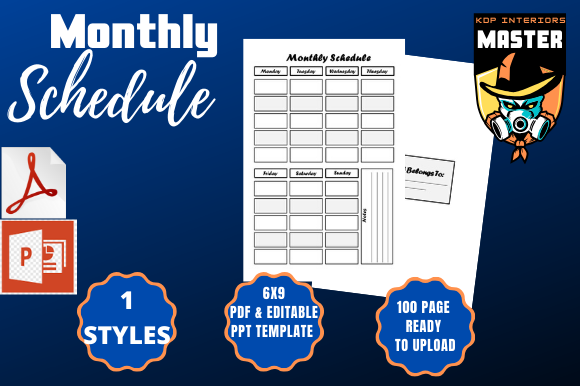
Monthly Schedule: A Practical Tool for Workflow Planning and Execution
For professionals, creators, entrepreneurs, and educators, managing time effectively is a constant challenge. A monthly schedule offers a structured yet flexible way to organize priorities, track progress, and align daily actions with broader goals. Whether used independently or as part of a larger planning system, a monthly schedule helps users stay focused, reduce decision fatigue, and maintain momentum across projects and responsibilities.
Understanding the Monthly Schedule
A monthly schedule is more than a calendar—it's a strategic tool that allows individuals and teams to map out key milestones, deadlines, and recurring tasks within a 30- to 31-day period. It provides a bird’s-eye view of time allocation, helping users visualize how different activities fit together. Unlike daily planners or weekly overviews, the monthly format encourages long-term thinking while still allowing room for adjustments as priorities shift.
This type of schedule is especially useful for project managers, content creators, marketers, and small business owners who need to coordinate multiple timelines and resources. It can serve as a reference point for team meetings, client updates, and personal accountability systems.
Integration with Broader Workflows
A monthly schedule fits naturally into a multi-tiered planning system that includes annual goals, quarterly objectives, weekly to-do lists, and daily action items. It acts as a bridge between high-level strategy and day-to-day execution. For example, a marketing team might use a monthly schedule to break down a quarterly campaign into manageable phases, each aligned with specific deliverables and checkpoints.
- Before a project, a monthly schedule helps outline phases, allocate resources, and set expectations.
- During a project, it supports progress tracking, deadline management, and mid-course adjustments.
- After a project, it can be used for review, reflection, and identifying areas for improvement.
This versatility makes the monthly schedule an essential component of any productivity toolkit, especially when combined with tools like task management software, time-tracking apps, and collaborative platforms.
Practical Implementation Tips
Implementing a monthly schedule successfully requires more than just filling in dates. It demands a clear understanding of your priorities, available resources, and potential constraints. Here are some practical steps to help integrate a monthly schedule into your workflow:
- Start with key milestones—Identify the major deliverables, deadlines, or events that must be included in the schedule.
- Block time for recurring tasks—Reserve space for regular activities like meetings, content publishing, or client check-ins.
- Leave room for flexibility—Avoid overloading the schedule; unexpected tasks will arise, and adjustments are inevitable.
- Use color coding—Assign colors to different categories (e.g., client work, administrative tasks, personal goals) for visual clarity.
- Review and update regularly—Set aside time each week to assess progress and make necessary changes.
These steps help ensure that the schedule remains a dynamic, useful tool rather than a static document that quickly becomes obsolete.
Compatibility with Other Tools and Platforms
A monthly schedule works best when integrated with other tools that support task management, collaboration, and communication. For example:
- Project management tools like Trello, Asana, or Monday.com can house detailed task lists that correspond to the monthly plan.
- Calendar apps such as Google Calendar or Outlook can sync with your monthly schedule to provide daily reminders and alerts.
- Time-tracking tools like Toggl or Harvest can help assess how much time is actually being spent on scheduled tasks versus initial estimates.
When used together, these tools create a cohesive system that enhances accountability, improves forecasting accuracy, and streamlines decision-making. The key is to maintain consistency in how data is entered and updated across platforms.
Workflow Examples
Consider a freelance content creator who uses a monthly schedule to manage multiple client projects, personal branding efforts, and self-care routines. At the start of each month, they map out client deadlines, content publishing dates, social media planning sessions, and dedicated blocks for research, writing, and editing. They also schedule time for administrative tasks like invoicing and email management.
By aligning their monthly schedule with a task management app and a shared calendar for client meetings, they ensure that all activities are coordinated and visible at a glance. This system allows them to stay on top of deadlines without feeling overwhelmed and to communicate more effectively with clients about availability and progress.
Another example is a small business owner using a monthly schedule to plan product launches, team meetings, marketing campaigns, and customer service shifts. They might integrate the schedule with a shared document that outlines campaign assets, budget allocations, and performance metrics. This helps the team stay aligned and responsive to changing conditions.
Quality Control and Long-Term Use
One of the most important aspects of maintaining a monthly schedule is ensuring its accuracy and relevance over time. This involves regular reviews and updates based on actual performance and evolving priorities. To support long-term use:
- Conduct monthly retrospectives to evaluate what worked and what didn’t.
- Adjust templates based on lessons learned and changing workflows.
- Archive completed schedules for future reference and historical analysis.
These practices help build a more refined and personalized planning system that adapts to your unique needs and circumstances. Over time, this leads to better time management, reduced stress, and more consistent results.
Why the Monthly Schedule Format Matters
The format of a monthly schedule—especially when it's professionally designed and optimized for platforms like KDP—plays a significant role in its usability and effectiveness. A well-structured PDF file with bleed settings enabled and standard dimensions (like 6x9 inches) ensures that the document prints cleanly and is easy to use in both digital and physical formats. Including a PPT file adds another layer of flexibility, allowing users to present schedules to teams or clients in a visually engaging way.
When choosing or creating a monthly schedule template, it’s important to consider:
- Clarity of layout—Ensure that dates, tasks, and notes are easy to read and organize.
- Customizability—Look for templates that allow for easy editing and personalization.
- Compatibility—Verify that the file works well with your preferred software and printing services.
These factors contribute to a smoother user experience and greater long-term value.
Final Thoughts on Monthly Scheduling
A monthly schedule is more than a planning tool—it's a framework for intentional living and working. Whether you're managing a creative project, running a business, or pursuing personal development goals, having a clear view of your month helps you make better decisions, prioritize effectively, and maintain momentum. By integrating it with your existing tools and processes, you create a system that supports both structure and adaptability, two essential qualities in today’s fast-paced environment.