Bill Reminder: Your Low-Content Book Solution for KDP
If you're looking to expand your low-content book library on Amazon KDP, a Bill Reminder book can be a valuable addition. Designed to help people track their monthly expenses, this practical format blends utility with simplicity, making it appealing to a wide audience. Whether you're new to publishing or an experienced creator, the Bill Reminder template offers a ready-to-use interior that's both editable and professionally designed.
What Is a Bill Reminder Book?
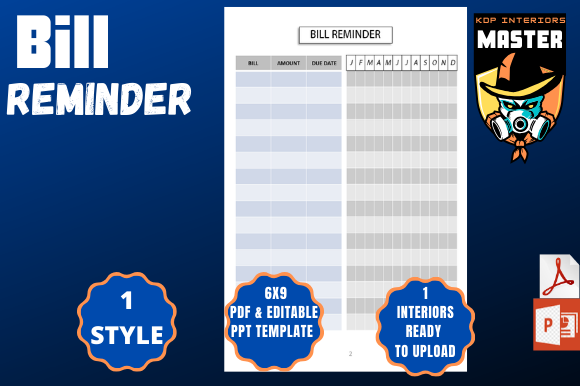
A Bill Reminder book is a functional planner designed to help users organize and track recurring bills. It typically includes pages for listing monthly expenses, due dates, payment methods, and notes. This type of low-content book is especially useful for people who prefer a physical planner over digital apps for managing personal finances.
Why Use a Bill Reminder Book?
Many people struggle to keep track of bills, especially when payments come from multiple sources or vary slightly each month. A Bill Reminder book provides a structured, tactile way to stay on top of financial obligations. It's ideal for budgeters, minimalists, and anyone who appreciates the satisfaction of checking off completed tasks by hand.
Who Benefits from a Bill Reminder Book?
- Beginners who are new to budgeting and want a simple tool to start tracking expenses
- Freelancers and entrepreneurs who manage irregular income and need to plan for monthly outflows
- Minimalists and planners who prefer analog tools over digital apps
- Small business owners who want to track recurring business expenses
What’s Included in the Bill Reminder Template?
This professionally designed Bill Reminder package includes a 60-page PDF interior formatted for Amazon KDP with a 6x9-inch trim size and bleed off. You'll also receive an editable PowerPoint file, allowing for quick and flexible customization. The template is clean, modern, and built to support a variety of user preferences and branding styles.
Key Features of the PowerPoint Template
- You can quickly duplicate slides to expand the book or customize layouts
- Change fonts, colors, shapes, and backgrounds to match your brand
- Upload your own fonts for a unique look
- Save your work as a full PDF or export individual pages
- Import your own data or notes from your computer
- Duplicate shapes and pages to create variations or add new features
- Switch to a “black paper” interior for a dramatic, high-contrast aesthetic
- Insert slides from other PowerPoint files to mix and match templates
- Create a matching cover design and add page numbers for a professional finish
- Edit in bulk to save time when updating multiple pages at once
How to Use the Bill Reminder Template
Using the Bill Reminder template is straightforward, even if you're new to PowerPoint or self-publishing. Start by opening the editable file and explore the layout options. You can customize colors to match your brand, change fonts for better readability, or add your own logo or watermark. Once you're satisfied with the design, export the file as a PDF and upload it directly to Amazon KDP.
Customization Tips for Best Results
- Try different color schemes to match seasonal themes or personal branding
- Use high-contrast fonts for better readability, especially in black paper mode
- Add your own financial tips or motivational quotes to personalize the content
- Consider creating variations like “Bill + Budget Tracker” or “Monthly Expense Planner”
- Use the duplicate feature to create themed versions (e.g., student edition, family edition)
Why Choose PowerPoint for Your Low-Content Book?
PowerPoint may not be the first tool that comes to mind when designing low-content books, but it offers several advantages. Its intuitive interface makes it easy to edit, duplicate, and rearrange pages without needing advanced design skills. Plus, the ability to export individual slides as PDF pages gives you more control over formatting and layout adjustments.
Where Can You Sell a Bill Reminder Book?
The Bill Reminder book is ideal for platforms like Amazon KDP, Etsy, and other print-on-demand services. It appeals to a broad audience, making it a reliable choice for creators looking to build a profitable low-content library. You can also bundle it with related planners like budget trackers, habit planners, or weekly organizers to increase your offerings.
Real-World Use Cases
- Personal finance bloggers can use it as a lead magnet or printable resource
- Small businesses might offer it as a branded giveaway or digital download
- Educators can recommend it as a budgeting tool for students learning financial literacy
- Coaches and influencers can bundle it with digital courses or membership programs
Important Considerations Before Publishing
Before publishing your Bill Reminder book, ensure your design complies with Amazon KDP guidelines. Check the margins, fonts, and image resolution to avoid formatting issues. Also, consider your target audience—will they prefer a minimalist design or more visual elements? Test different versions to see what resonates best.
Final Thoughts
The Bill Reminder book is more than just a planner—it's a practical tool that solves a real-life problem. With its customizable PowerPoint template and ready-to-upload PDF, it offers a flexible and profitable option for low-content creators. Whether you're building your first book or expanding your catalog, this template gives you the tools to create something both useful and marketable.